
Karnataka 2nd PUC Results Available on DigiLocker
Announcement of Results
The Karnataka School Examination and Assessment Board (KSEAB) is set to announce the 2026 results today, April 9, at 3 PM. Following the announcement, students can access their marksheets via the online platform DigiLocker.
It is important to note that when students log into DigiLocker immediately after the results are declared, they may not see the result option right away. This is a temporary issue, and students should not panic as the marksheets can still be accessed through a few simple steps.
About DigiLocker
DigiLocker is a digital initiative launched by the Government of India that allows citizens to securely store and access important documents online. This service offers digital copies of essential documents such as marksheets, Aadhaar cards, and driving licenses.
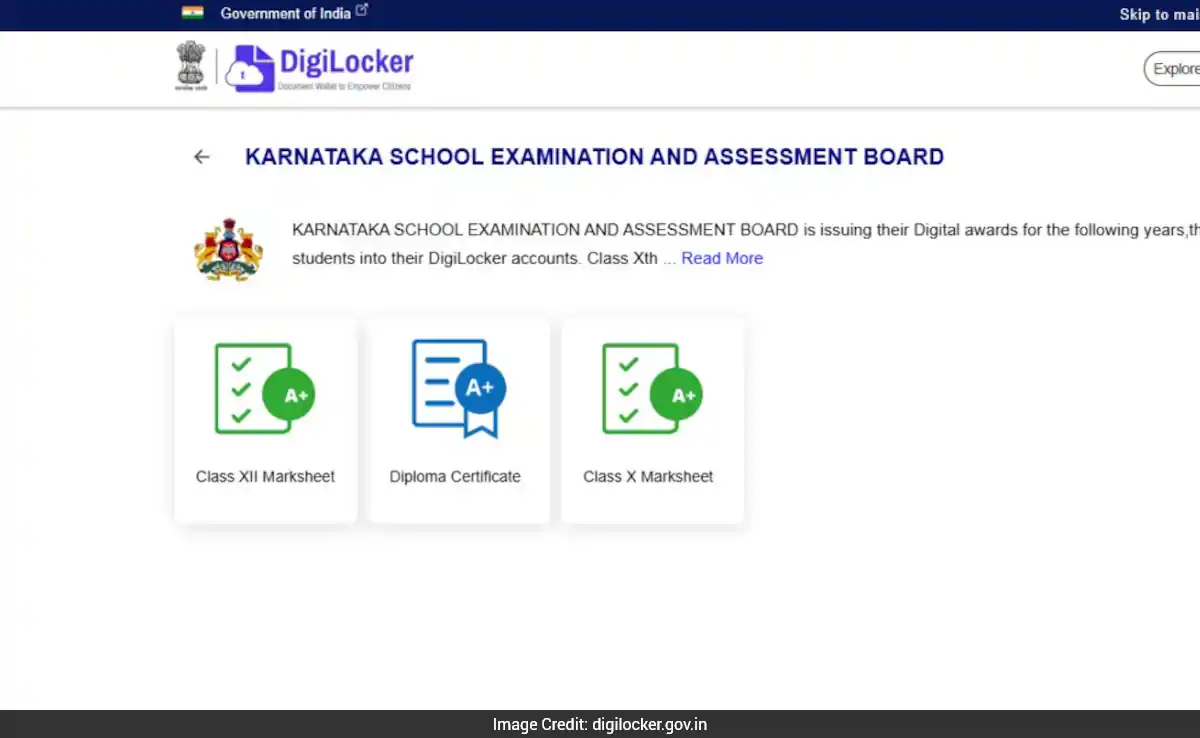
If the result link is not available on DigiLocker immediately after the results are announced, it may indicate that the marksheets are being uploaded gradually. In this case, students are advised to log in again after some time and can also find their marksheets by searching “Karnataka School Examination and Assessment Board” or “KSEAB” in the search box.
Steps to Check the Result via DigiLocker
To view the Karnataka 2nd PUC results through DigiLocker, students can follow these steps:
1. Visit the official DigiLocker website at digilocker.gov.in or open the DigiLocker mobile application.
2. Log in using your registered mobile number or Aadhaar number.
3. On the homepage, search for “Karnataka School Examination and Assessment Board.”
4. Select the “KSEAB Class 12th Marksheet” option.
5. Enter your roll number along with any other required details.
6. Your digital marksheet will then be displayed on the screen.
7. Download and save the marksheet for future reference.
Details Included in the Digital Marksheet
The digital marksheet that students can access on DigiLocker will contain vital information, including the student’s name, parent names, roll number, school name, and exam-related details.
Additionally, it will provide subject-wise marks, total marks, passing criteria, and the overall division achieved. Students are encouraged to review all details on their marksheet carefully after downloading it.
Follow US
https://www.facebook.com/charchaexpress
https://www.youtube.com/@charcha-express
https://www.instagram.com/charcha.express/
Contents
Announcement of ResultsThe Karnataka School Examination and Assessment Board (KSEAB) is set to announce the 2026 results today, April 9, at 3 PM. Following the announcement, students can access their marksheets via the online platform DigiLocker.It is important to note that when students log into DigiLocker immediately after the results are declared, they may not see the result option right away. This is a temporary issue, and students should not panic as the marksheets can still be accessed through a few simple steps.About DigiLockerDigiLocker is a digital initiative launched by the Government of India that allows citizens to securely store and access important documents online. This service offers digital copies of essential documents such as marksheets, Aadhaar cards, and driving licenses.If the result link is not available on DigiLocker immediately after the results are announced, it may indicate that the marksheets are being uploaded gradually. In this case, students are advised to log in again after some time and can also find their marksheets by searching “Karnataka School Examination and Assessment Board” or “KSEAB” in the search box.Steps to Check the Result via DigiLockerTo view the Karnataka 2nd PUC results through DigiLocker, students can follow these steps:1. Visit the official DigiLocker website at digilocker.gov.in or open the DigiLocker mobile application.2. Log in using your registered mobile number or Aadhaar number.3. On the homepage, search for “Karnataka School Examination and Assessment Board.”4. Select the “KSEAB Class 12th Marksheet” option.5. Enter your roll number along with any other required details.6. Your digital marksheet will then be displayed on the screen.7. Download and save the marksheet for future reference.Details Included in the Digital MarksheetThe digital marksheet that students can access on DigiLocker will contain vital information, including the student’s name, parent names, roll number, school name, and exam-related details.Additionally, it will provide subject-wise marks, total marks, passing criteria, and the overall division achieved. Students are encouraged to review all details on their marksheet carefully after downloading it.